
How to Find Keyword Ranking in Google: 5 Methods (Free and Paid)
Quick answer: The fastest way to find your keyword ranking in Google is Google Search Console. Open Performance, turn on Average position, and filter by your keyword. It is free and uses real search data. It is not the only method, so this guide shows all five and tells you when to use each.
If you run a business in Egypt, Saudi Arabia, Oman, Jordan or Iraq, there is one extra complication: your ranking changes by country, city and device. We also cover how to check rankings the right way for your market.
Quick answer: 5 ways to check your Google keyword ranking
| Method | Cost | Best for | Main limit |
|---|---|---|---|
| Google Search Console | Free | Your own site, ongoing tracking | Average, not live; only keywords that earned impressions |
| Google Analytics (linked to Search Console) | Free | Seeing rankings next to traffic and conversions | Needs Search Console linked; same data as Search Console |
| Manual check (incognito) | Free | One-off spot check | Skewed by location and personalisation |
| Free rank checker (Ahrefs, SE Ranking, Seobility) | Free, limited | Quick lookups, competitors | Few keywords per check |
| Paid rank tracker (Semrush, Ahrefs, SE Ranking, SERPWatcher) | Paid | Daily tracking, many keywords, competitors | Subscription cost |
What is keyword ranking in Google?
Keyword ranking is the position your page holds in Google’s organic results for a specific search. If your page is the third organic result for “digital marketing agency in Riyadh”, your ranking for that keyword is position 3.
Positions are not fixed. Google tailors results to the searcher’s country, city, language, device and search history. Two people searching the same phrase can see different orders. That is why a ranking is best read as a range or an average, not a single permanent number.
Ranking, impressions, clicks and CTR
Four numbers describe how a keyword performs, and you need all four:
- Position: where you appear in the results.
- Impressions: how many times your page appeared in results.
- Clicks: how many times people clicked it.
- CTR (click-through rate): clicks divided by impressions.
A high position with a low CTR usually means your title and description are not persuasive. A low position with many impressions means a ranking opportunity: Google already considers you relevant, and you have room to climb.
Why checking keyword rankings matters
Rankings are the quickest signal of whether your SEO work is paying off. When positions rise, your content and links are doing their job. When they fall, it is time to review the page before traffic follows.
Tracking also helps you:
- Find striking-distance keywords. Keywords at positions 8 to 20 often need only a content update or better internal links to reach page one.
- Spot cannibalization. If two of your pages swap positions for one keyword, they are competing with each other.
- Measure competitors. You can see who outranks you and what their page does differently.
- Report to stakeholders. Clear before-and-after positions make SEO results easy to explain.
- Catch problems early. A sudden drop across many keywords can point to an indexing, technical or algorithm issue.
Method 1: Google Search Console (free, most reliable for your own site)
Google Search Console is free and powerful. It shows which keywords bring traffic and their average position, which is crucial for knowing your current rank. It reports how your site actually performed in Google Search, so it is the baseline every other tool should be compared with.
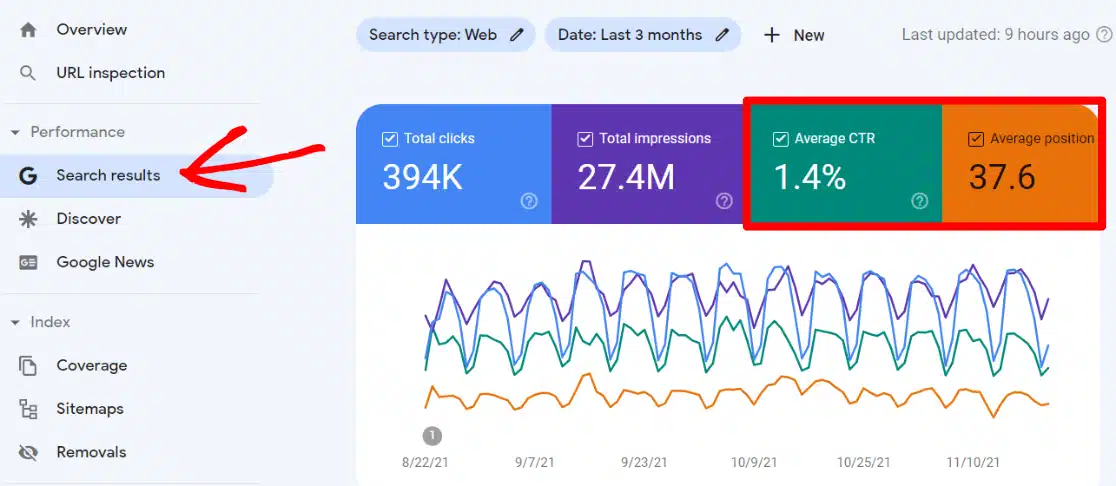
Step-by-step
- Sign in to Google Search Console and select your verified property.
- Open Performance in the left menu, then Search results.
- Click the Average position tile so it is highlighted.
- Click New and add a Query filter for your keyword. Use “Exact match” if you want only that phrase.
- Add a Country filter, then a Device filter. This is the step most people skip, and it changes the number a lot.
- Switch to the Pages tab to see which URL ranks for the keyword.
What “average position” really means
Average position is the mean of your highest position each time the page appeared. If you ranked 3 for half of the impressions and 9 for the other half, the average is 6. It is a useful trend line, not a live rank.
Limits of Search Console
- Not real time. Data arrives with a delay of roughly a day or two.
- Only keywords with impressions. If you never appeared, the keyword is not listed.
- Limited history. Search Console keeps about 16 months of data, so export it regularly.
- Some queries are hidden. Rare queries are anonymised for privacy, so totals can exceed the sum of listed queries.
- Your property only. You cannot see a competitor’s rankings.
Method 2: Google Analytics
Google Analytics does not measure keyword rankings by itself. It shows them only when linked to Search Console.
How to connect Search Console to Analytics
- In Google Analytics 4, go to Admin, then Product links, then Search Console links.
- Choose the property and the matching data stream, then confirm.
- Publish the Search Console reports in your Reports library (they are not shown by default).
- Open Reports > Search Console > Queries to see queries with clicks, impressions and average position next to sessions and conversions.
The benefit is context: you can see which keywords bring visitors who actually enquire, not only visitors. Allow a few days for data to appear after linking.
Method 3: A manual check, done properly
Typing your keyword into Google is quick, but your own history and location bend the result. If you do it, reduce the bias.
How to check manually without personalisation
- Open an incognito or private window and sign out of Google.
- Search the keyword and count the organic results only. Skip ads, the map pack, AI Overviews and “People also ask” boxes.
- Set the country and language. On google.com you can add
&gl=sa&hl=arto the URL for Saudi Arabia in Arabic, or&gl=egfor Egypt. - Repeat on mobile, because mobile and desktop results differ.
When a manual check is enough
Use it to confirm a drop you spotted elsewhere or to look at what the results page contains. Do not use it to report rankings: even in incognito mode, Google still uses your IP location.
Method 4: Free rank checkers
Free tools let you look up a keyword and domain without a full subscription. Typical choices:
- Ahrefs Free Keyword Rank Checker: shows where a domain ranks for a keyword across many countries.
- SE Ranking and Seobility checkers: let you choose country, device and sometimes city.
- Ubersuggest: a budget-friendly option that lists keywords a site ranks for.
They are good for fast lookups and for checking a competitor. Free versions limit the number of checks, so they are not a tracking system.
Method 5: Paid rank trackers
If you manage many keywords, several locations or client reports, a rank tracker saves hours.
What a rank tracker adds
- Daily or weekly position updates for hundreds or thousands of keywords
- Tracking by country, city and device
- Competitor comparison and visibility trends
- SERP feature tracking (featured snippets, local pack, People also ask)
- Scheduled reports you can send to clients
Tools to consider
SERPWatcher tracks ranking progress daily and visualizes keyword performance, which makes it a good fit for small teams. Semrush, Ahrefs, SE Ranking and Moz are also widely used.

Compare tools on three things: price per tracked keyword, whether they support your target countries and Arabic keywords, and report quality. Test a free trial with your real keywords before paying.
Note: Google Keyword Planner is not a rank checker. It shows search volume and keyword ideas, not your position.
How to track rankings in AI Overviews and AI Mode
Google now answers many searches with an AI Overview or AI Mode response that cites a handful of sources. Being cited there is a new kind of visibility, and it is not reported as a position.
What you can do today
- Search your target questions in AI Mode and note whether your site is cited.
- Use a tool that tracks AI citations if your SEO platform offers one.
- Keep tracking classic rankings too: pages that rank well and answer the question clearly are the ones most likely to be cited.
Treat AI citations as a separate metric next to position, and record them with a date, because answers change from one day to the next.
How to read your ranking data
A number on its own says little. Read it together with impressions, clicks and CTR.
| What you see | What it usually means | What to do |
|---|---|---|
| Position 1 to 3, low CTR | Title or description is not compelling | Rewrite the title and meta description |
| Position 4 to 10, steady | Page is relevant but not the best answer | Expand and sharpen the content |
| Position 11 to 20, many impressions | Striking distance: Google sees relevance | Update content, add internal links |
| Position 21 and below | Weak match or weak authority | Check intent; consider a new, focused page |
| Sudden drop across many keywords | Technical, indexing or algorithm change | Run a technical check first |
How often should you check?
Review rankings monthly for strategy and weekly for pages you are actively improving. Checking daily adds noise, because positions move a little every day.
Track by country and device
A keyword can rank 4 in Riyadh and 12 in Cairo. Track each target market and each device separately, or you will average away the differences that matter.
How to improve a keyword ranking
Finding the position is step one. Moving it takes work on the page and on the site.
1. Match search intent
Look at what already ranks. If the top results are step-by-step guides, a sales page will not compete. Give searchers the format they expect.
2. Improve the content
Answer the question in the first paragraph, then cover the sub-questions people ask. Use the keyword naturally in the title, H1, headings and opening, and add original examples from your own work.
3. Rewrite the title and meta description
Speak to the benefit and include the keyword near the start. This improves CTR even when position stays the same.
4. Strengthen internal links
Link to the page from related articles using descriptive anchor text. It is one of the cheapest changes with a visible effect.
5. Earn quality backlinks
Links from relevant, trusted sites signal authority. Focus on a few good ones, not volume.
6. Fix technical issues
Check that the page is indexed, loads quickly on mobile and has a correct canonical tag.
7. Refresh regularly
Update statistics, screenshots and tools. A page that is kept current holds its position better.
Common mistakes when tracking keywords
- Tracking too many keywords. Start with 20 to 50 that match real business goals.
- Ignoring local intent. For regional businesses, track city and country versions of each keyword.
- Trusting one personalised search. Your own results are not your customers’ results.
- Chasing position without clicks. A top ranking with a poor CTR brings little traffic.
- Mixing mobile and desktop data. Report them separately.
- Relying on one tool. Compare Search Console with a rank tracker. Small differences are normal; large gaps need investigating.
- Not recording history. Export Search Console data monthly so you keep more than 16 months.
Frequently asked questions
How do I check my keyword ranking for free?
Use Google Search Console for your own site. For a quick lookup, including competitors, use a free checker such as Ahrefs, SE Ranking or Seobility.
What are the best tools to find keyword ranking in Google?
Search Console for accuracy on your own site, plus a rank tracker such as SERPWatcher, Semrush, Ahrefs or SE Ranking when you need daily tracking, many keywords or competitor data.
How often should I check my keyword rankings?
Monthly for strategy, weekly for pages you are working on. Daily checks mostly show noise.
Can I track keyword rankings for multiple websites at once?
Yes. Paid rank trackers let you manage several projects and locations from one account. Search Console requires a separate verified property for each site.
How do I interpret average position in Search Console?
It is the average of your top position across all impressions for a query or page. Read it as a trend, and filter by country and device to make it meaningful.
Can I see keyword rankings in Google Analytics?
Only if Search Console is linked to Analytics. Analytics then shows queries with clicks, impressions and average position.
What factors affect my keyword ranking?
Content quality and match to search intent, backlinks, technical health, page experience, internal linking, and the searcher’s location and device.
What is the difference between organic and paid rankings?
Organic rankings are earned results below the ads. Paid positions are ads you bid for. This guide covers organic rankings.
Why does my ranking differ between tools?
Tools use different locations, devices, data centres and update times. Search Console averages real impressions; trackers record a snapshot at one point in time.
How Marketing House can help
If you have found your rankings and are not sure what to do with them, our SEO team can help. We run keyword audits, competitor analysis, on-page optimisation and monthly reporting for businesses across Egypt, Saudi Arabia, Oman, Jordan, Iraq and the wider GCC and MENA region.
Want to know which keywords are one step from page one?
Get a keyword ranking reviewConclusion
Start with Search Console to see your real positions, filter by country and device, and add a rank tracker once you need daily data or competitor comparison. Then act on what the numbers show: fix titles that earn no clicks, improve pages sitting at positions 8 to 20, and re-check each month.